Capture previews
Every card below renders what bob capture --dry-run --no-clip --format json returns for the current draft, in bob's own order. The explicit Preview button and Capture resolve the clipboard and mirror the full block; continuous live preview passes --no-clip. Insertion behavior for the rows is in Task pickers and Relationship pickers.
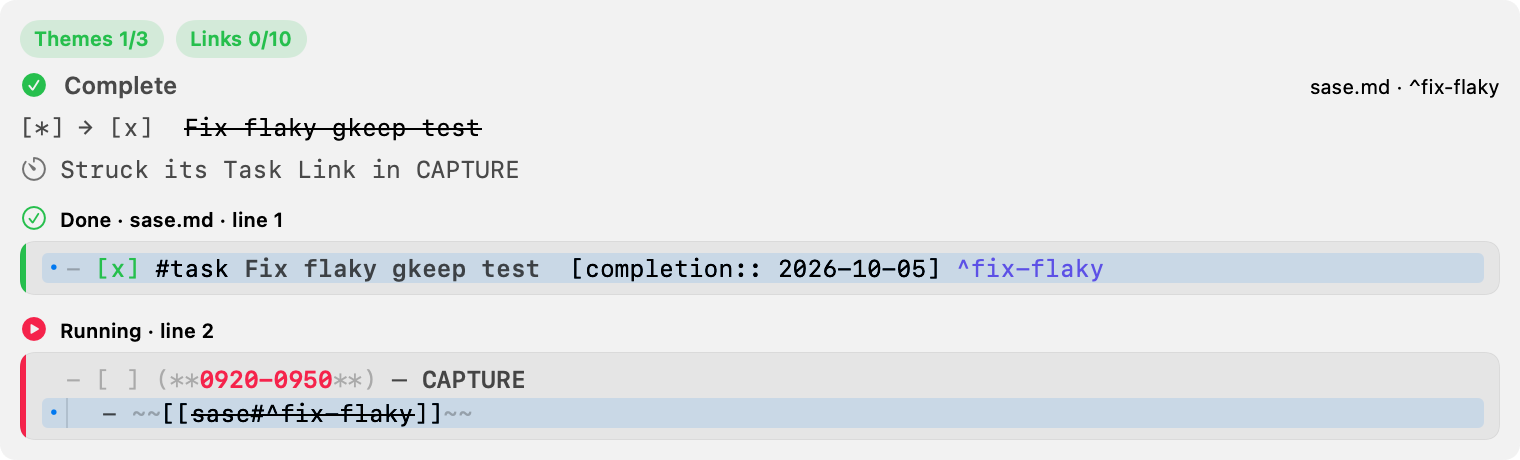
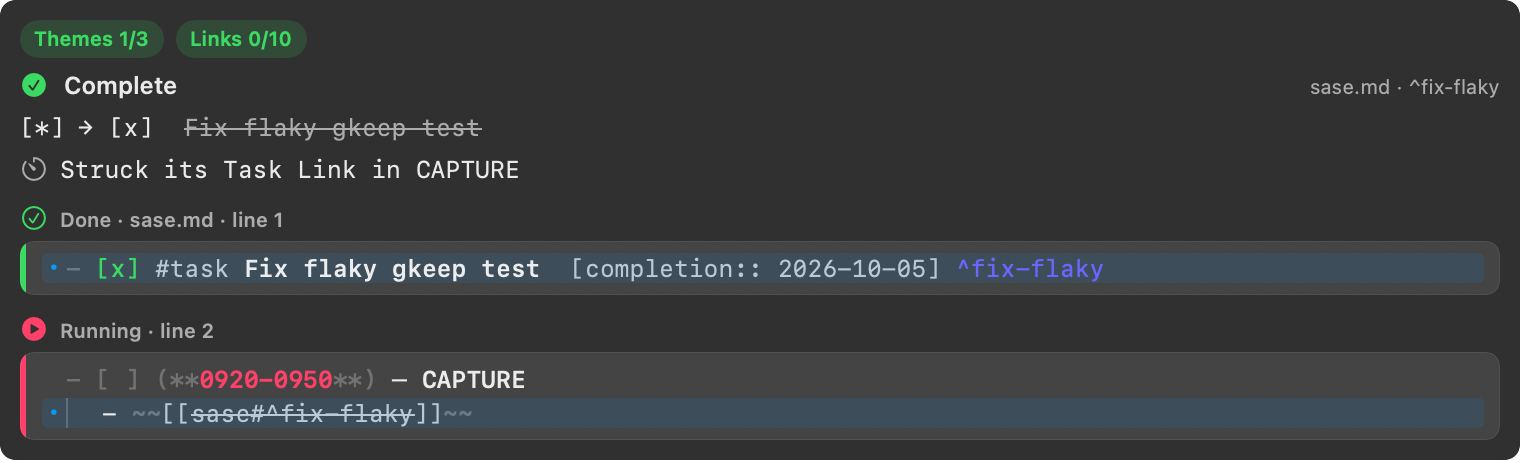
Synthetic CI render. Open the image for full-size text.
Start overrides
A = override restart or swap previews on the same start card with an orange
warning banner as the first row, reworded titles, status, badges, footer action,
and notifications, built only from Bob's additive pomodoro_start.override
object (action restart/swap, leftover "start" as a plain start, ledger
kept/fresh, previous including overdue, demoted, close_first). An older
Bob that omits the object decodes as a plain = start with no behavior change,
and an unknown override action degrades to a plain start; the app never computes
ledger ranges itself. The footer's primary Return tints orange whenever the
on-screen preview contains an override. An override commits only after its
warning was on screen: every real submit passes hidden --refuse-override
unless that preview belongs to this exact draft, analysis generation, and bob
client and shows the override. A pomodoro_override_refused answer keeps the
draft, re-previews, and asks for Return again. An older bob that rejects the
flag is retried without it and that answer is remembered for that executable.
Templates
A Bob template candidate for @@te or @@ is shown as the @@template: directive
with Bob's label beneath it; accepting inserts Bob's replacement verbatim. The +
shortcut does not accept this header candidate.
When the route list includes a template candidate at bare @@, its header shows
that typing @ again starts a template.
Template fields decode tolerantly: an older Bob omits them and keeps ordinary drafts
working. A new Bob with an older app exposes unknown template span kinds as neutral
text. An older Bob refuses @@template: before writing anything, so upgrade Bob before
submitting a template draft.
Template drafts live in the Saved templates shelf.
Live preview
Live preview calls bob capture --dry-run --no-clip --format json -- <draft> through
a dedicated process-client API that asserts --no-clip. Bob's admitted URL %
listen marker remains a reference request in continuous preview; ordinary clipboard
spans stay literal until the separate explicit clipboard-resolving preview.
Template previews show a Template · N rows capsule beside the capture count. When
Bob reports the template_row need, the panel keeps the preview calm and shows Bob's
template_missing_rows message. Non-info template diagnostics underline the matching
typed text in the editor.
Batch drafts and authored children
The additive sub_bullets field on capture output is the exact rendered authored
child lines, including Bob's target-selected indentation, and is omitted entirely when
a draft has no authored bullets. capture-parse keeps sub_bullets as normalized
bodies and adds aligned sub_bullet_depths values (1 or 2); missing depths from an
older bob decode as depth 1, and mismatched depths are ignored safely.
capture-parse also decodes Bob's additive items array for batch drafts,
preserving item index, source range, physical line range, route, section, needs, and
authored-child depths. Its additive global_destination object is decoded
tolerantly; absent metadata means the connected bob binary predates global
destination declarations.
Template parsing adds a nullable header/range/field/row object and per-row items with
UTF-8 source ranges. Template rows never open pickers; a row-incomplete need keeps the
dry-run preview idle until a row is added. Capture responses add a template summary and
per-capture row numbers, including the legacy one-result response shape.
Capture results
bob capture --format json keeps the legacy top-level first result for a single
capture or compatibility fallback, and may add an ordered captures array for a batch.
The app normalizes both shapes to one collection before updating preview, status,
VoiceOver announcements, and notification content; it forwards the batch-level
open_notes array unchanged for Control-Return instead of re-deriving destinations.
It keeps the additive top-level global_destination summary alongside that normalized collection
and never splits a draft into multiple mutating bob subprocesses. When live preview
reports exactly one task_toggle, the footer's primary action changes from
Capture to Set Next, Set Open, or Ensure Next according to
Bob's returned behavior metadata; when it reports exactly one pomodoro_link,
the action becomes Start if the link starts a session and Link otherwise;
a single close — whole-item x, link =x, or new-task =x — becomes
Close; a single whole-item =/=<X> start becomes Start, a =
restart of the running session becomes Restart, and a =#name swap becomes Swap; a single
whole-item !note:block-id completion becomes Complete;
batches keep Capture because Return will submit more than the toggle.
Ensure Next preview, VoiceOver, and notifications present status and relocation
independently ("Ready → Next" vs "Next unchanged", "Moved LATER → CURRENT" vs
"Already in CURRENT; no Pomodoro changes") and never show the two-way "adds
link" or "removed later links" rows. Committed notification titles summarize
the actual result (combined, status-only, move-only, or already-Next no-op);
Open Note/Open Notes includes the daily note only when pomodoro_link_action
is moved. Pomodoro-link captures notify as Started NAME, Linked to NAME,
Moved to NAME, or Already in NAME, batch lines use the link transition text
under a Link kind, and Open Note/Open Notes includes the daily note whenever
the link inserted, moved, or started a session. A Pomodoro close notifies as
Closed NAME with a session-and-timing line, a tasks-and-Work-Log line (with a
completed count when nonzero), and
the next-session line; link and new-task closes use the same title and body,
batch lines append (closed NAME) under a Close kind, and Open Note
targets the day file, which a close always writes. A project note that links
tasks previews a link section ("Links 2 tasks into ADMIN (new)", one row per
task with its text and ^id), notifies "Linked 2 tasks into ADMIN", and
includes the daily note in Open Note(s) whenever task_links is non-empty.
Preview stack
Preview shows every block Bob will write, in Bob's own order: each item's parent
task_line, authored children, then clip.lines and schedule_log.lines when the
response carries them. Task-toggle items instead show the route/block destination, the
status transition, the daily-note destination, and the + or − Pomodoro-link line
Bob planned. Pomodoro-link items show the route/block destination, the status
transition ([ ] → [*], [*] already Next, [/] stays In Progress), the daily-note
destination, and the ledger outcome Bob planned (Linked under BUGS,
Moved Task Link BUGS → FOCUS (created FOCUS), or
Task Link already in BUGS; no ledger change.), plus the atomic-start session row
when the link starts one. Every item with a pomodoro_link_destination also
shows a destination row above it (→ GOALS · next up, → running GOALS 0945–1015,
→ new Pomodoro BOB, with a timer symbol) from the destination role, and a
batch that changed today's Pomodoros section shows one plan-budget meter row above
the items (Themes 3/3, Links 8/10 capsules — green within the cap, red over —
a +1 BOB delta chip whenever the themes meter grew, and orange warning captions).
Both rows join the VoiceOver summary.
Close card
A Pomodoro close instead shows its own card whenever
pomodoro_close is present: a stop.circle.fill header with the Close NAME
title and the monospaced session range (the shortened half tinted with the
Pomodoro-session colour), the day-file destination plus a timing chip that is
orange when early, green when on time, and secondary when over, a link via
row for link closes (Linked bob.md · ^ready into CAPTURE, Moved from SASE)
or a plus.circle row for new-task closes, up to six task rows with per-role
glyphs, transitions ([*] → [/], [*] deferred, [x] closed, [x]), text
with strikethrough on struck rows, trailing locators, and Work Log previews —
badges, transitions, and tags never wrap or shrink, and at narrow widths the
locator truncates first, then the one-line task title; row titles show wikilink
display text ([[path|Alias]] reads Alias), like the pickers —
each row shows its typed_work_log entries first, all of them, with the date
stripped, a square.and.pencil glyph in the cyan log tint, and primary text,
each followed by its typed_work_log_details lines in secondary callout
text, indented to the entry text with no glyph and never capped, followed by
the remaining work_log entries in secondary text capped at two —
then a notes row (1 note stays), a next-session footer row, and an
empty state (No Task Links — the session simply closes) when there are no
task rows. Numbered rows start with a fixed-width badge — a filled
N.circle.fill when the row is listed, an open N.circle otherwise (monospaced
digits in a capsule past 50), tinted orange for in progress, green for
complete, and secondary for deferred, with unlisted rows dimmed so chosen rows
stand out; unnumbered rows keep a clear spacer so text stays aligned, and with
no numbered rows the card looks exactly like today's. Completed rows keep the
embedded glyph tinted green with struck text and a [*] → [x] transition when
the status changed. One caption row under the task rows teaches the syntax
before a selection is typed (x1,2 keeps only these in progress · … · x 2
wrote the tests logs work to 2, tinted like the editor spans, with the 2
in the cyan log tint) and shows the outcome summary after (In progress 1, 3
· Complete 2 · Deferred 4, or In progress none for x0); numbered rows
never hide under +N more. The accessibility label includes the typed
entries with their details after each entry. The footer's primary action becomes Close,
the live-preview, preview, and submit status read Would close … / Closed …
with started, completed (only when nonzero), and Work Log counts, and a failed
dry run clears the card so no stale preview sits beside the error. The error
callout shows Bob's message unchanged; a strict plan-budget refusal
(code == plan_theme_cap_exceeded) adds the hint line Queue it with ^ or
defer with $<N>. While a
list dangles on ,/!/~, the card previews the trimmed draft dimmed with a
Type a task number after , row, Close is disabled, and Return cannot
submit; while a Work Log bullet dangles (x plus - 1), the card previews
the rest dimmed with a Type the Work Log entry for task 1 row, Close
stays disabled, and Return cannot submit; a valid draft
restores the normal card. While a start list dangles on
~/,, the start card previews the trimmed draft dimmed the same way with
Start disabled instead.
Start card
A whole-item =/=<X> start instead shows its own card
whenever kind is pomodoro_start: a play.circle.fill header with the
Start NAME title and the monospaced session range, the day-file destination,
then one caption row — the teaching hint before a drop is typed, the drop
summary after (Dropped 2, 4, plus · nothing left queued when nothing stays
queued), or the pending notice while a list dangles — followed by the queued-task
rows merged with dropped rows in lineup order. A restart or swap puts an
orange warning banner first on the card (Overrides the running CAPTURE,
with the session range, a detail line, and a monospaced x = chip to close
it first) and tints the footer's primary Return orange. A = restart keeps the
start pink but swaps the header glyph for arrow.clockwise.circle.fill,
retitles to Restart NAME / Restarted NAME, reads
Would restart CAPTURE 0920-0945 → 0935-1000 (15m) at line 5 in the status,
and adds a dim was 0920–0945 caption under the destination. A
=#name swap instead uses arrow.left.arrow.right.circle.fill,
retitles to Swap in NAME / Swapped in NAME, reads
Would swap in BUGS 0920-0945 (takes over CAPTURE) at line 5 for a kept
ledger (or the fresh session range otherwise), adds a Takes over capsule
next to the title when the swap keeps the running ledger, and adds an
arrow.uturn.down demoted row (CAPTURE → first future · keeps 2 Task Links,
plus and its notes). Each numbered row gets the close
card's number badge (n.circle, filled for dropped rows, capsule above 50) with
status glyphs (circle Ready, circle.inset.filled Next,
circle.lefthalf.filled In Progress, questionmark.circle other,
minus.circle dropped, exclamationmark.triangle unresolved with the warning
as help text), task text (wikilink display text, like the pickers) with a
truncating note ^id locator; dropped rows
render struck and dimmed with a
caption joining stays <status> and with N nested line(s). Numbered rows never
hide under +N more; rows without numbers (older Bob) render exactly like
today's card. A created session shows a
small pink New capsule next to the title on a dry run (Created once
committed, and the notification reads Started NAME with 0905–0930 (25m)
· New session); with no drop typed and a non-empty lineup, a bare =/=<X>
start teaches Type ~2 to drop task 2 · #name to start a specific Pomodoro
(Type ~1 to drop it · … for one row), with ~N tinted like the drop span and
#name like the editor's name span, while a named start teaches only the drop
half. An empty lineup keeps the quiet Type #name to start a specific Pomodoro
caption, and named starts with an empty lineup show no hint. Dropped rows read
"Task 2, …, drops from today" and queued rows "Task 1, …, queued" for VoiceOver.
A = that overrides the running session shows the orange banner on the start
card instead of a still-running error, and an override commits only after its
warning was on screen. The footer's primary action
becomes Start (Restart for a restart, Swap for a swap), the live-preview, preview, and submit status read
Would start … / Started … with the session and line (plus · drops 2 /
· dropped 2 once a drop is typed), Would restart … / Restarted … with
the before → after range for a restart, and Would swap in … /
Swapped in … with the takeover or fresh range for a swap, and the notification
reads Started NAME with the session and queued-task count (counting tasks
only, plus · dropped 2), Restarted NAME with the en-dash session, queued
count, and · was 0920–0945, or Swapped in NAME with the taken range and the demoted
session back to first future. One item stays compact; a batch renders an ordered stack with item count,
destination/kind metadata, dividers, and exact previewBlockLines or toggle
transition rows. When Bob reports a global destination, preview and the destination
detail show one compact shared-scope line (All items → foo.md or
All items → foo.md · under ^a-id) and mark item-level deviations as local overrides
instead of repeating the shared target on every item. The outer auxiliary detail region
owns scrolling, so preview itself never nests another scroll view. The preview card
always takes its natural height: the window grows to show it in full up to the screen
limit before the auxiliary region scrolls, and the card keeps its last rendered height
while a live preview reloads. Continuous live
preview passes --no-clip, so it has no clip to show; the explicit Preview
button and Capture resolve the clipboard and therefore mirror the full block.
Pomodoro and task blocks
Whenever Bob reports batch-level pomodoro_blocks, every Pomodoro the capture
touches, creates, or reports renders once below the item stack as a full block view:
a status caption (Running · line 27 with a play.circle.fill glyph, Completed
with checkmark.circle.fill, Queued with circle.dashed) plus a pink New
capsule on a dry run (Created once committed), then a card with a status rail,
a diff gutter (+ green for added lines, • accent for changed lines with the old
text on hover, − red for removed lines), indent guides per depth, and the verbatim
lines Bob will write — tinted like the editor (pink time range, wikilink colors,
checkbox colors) with no truncation. An added line Bob marks as a surviving
successor link carries a trailing lock.open.fill badge (Unblocked successor
on hover and to VoiceOver). Standard items whose verbatim lines the blocks
already cover omit the duplicated stack, and the blocks dim to 0.6 together with the
close card while a close-list selection dangles. An older Bob that omits
pomodoro_blocks previews exactly as before. PomodoroBlockDesignTests renders the
adjust, close, link-move, created-named-start, and chain fixtures to PNG
(light/dark, 760/620 pt, scale 2) when BOB_MAC_CAPTURE_RENDER_DIR is set.
Whenever Bob reports batch-level task_blocks, every parent task a sub-bullet
capture wrote under renders once below the item stack as a full task card, before the
Pomodoro blocks: a picker-status caption (In Progress · sase.md · line 1 with the
@+ chooser glyph and color) plus a pink New capsule on a dry run (Created
once committed), then the shared diff card with task tinting (tertiary list markers,
checkbox colors, secondary #tags and [key:: value] fields, indigo trailing
^block-id, wikilink colors, semibold task-line prose) and no truncation. Covered
sub-bullet items switch to a compact ↳ Sub-bullet under ^id header (with
› SECTION when Bob reports one) and drop the verbatim stack and trailing note
line; uncovered items render exactly as before. Blocks above 24 rows fold quiet runs
of 4 or more unchanged rows into ⋯ N unchanged lines rows that expand on click
(with a Show all lines action); smaller blocks never fold. A single sub-bullet
names its parent in the status and summary (Preview → sase.md › ^id), and an older
Bob without task_blocks previews exactly as before. TaskBlockDesignTests renders
Deterministic scheduling
The preview path assigns a fixed BOB_PRIORITY_ROLL_SEED for the draft lifecycle so
randomized $<N> scheduled dates can be reused by submission. Bob derives
item-specific rolls from that seed for batch drafts, and the seed resets only after a
successful capture or discard.
Completing tasks with !
Completing tasks with !
A capture item that is exactly !note:block-id completes that existing open task
without closing a Pomodoro: the task line closes exactly as x!N would write it,
its Task Links retire in today's ledger the way bob task reconcile would retire
them, and Blocked dependents recover the way Ctrl+Enter recovers them. Bulk works
one ! item per blank-line-separated block; any failure rolls the whole batch back.
The completion preview card shows the struck task ([*] → [x] with Bob's clean
task text struck and dimmed), one row per closed embedded subtask, one row per
descendant left open, the ledger effect named per entry (Strikes/Struck its Task
Link in CAPTURE, with (completed) for completed entries,
Moves/Moved its Task Link SASE → CAPTURE, struck,
Task Link already in PLAN; drops/dropped the SASE copy,
removes/removed empty SASE), and one row per unblocked dependent — with
list.bullet.indent, timer, and lock.open.fill/lock.fill fact rows under
a green checkmark.circle.fill seal (Already done — nothing to change in gray for
the idempotent no-op). A dependent Bob linked into the predecessor's slot renders
with the Next tint, a trailing destination capsule (→ FIX,
→ new BOB · next up), an added ^id caption when Bob minted its block ID, and an
inbox capsule when it lives in an inbox file; a recovered dependent renders
secondary with a reason caption (Ready · not planned today); a dependent that
stays blocked renders muted with lock.fill and a stays Blocked · … caption.
An older Bob without text, struck_in, or dropped keeps
the count-based ledger wording and the local task-line text. The footer action is
Complete and every fact joins the VoiceOver summary. Notifications read
Completed: <task> (Completed N tasks for an all-completion batch) with
sase.md · unblocked <name> bodies, plus one extra line when anything was linked
(🔓 Next in FIX: <task>, 🔓 3 linked → FIX: …, 🔓 3 linked · FIX, SASE) or the
breaker fired. Open Note(s)
includes the daily note whenever the ledger changed or any successor was linked. An older Bob without
task_complete decodes as no completion preview and keeps the standard card; upgrade
Bob before using !.
Saving links to your reading queue
Saving links to your reading queue
A capture item that is exactly one bare link (alone, one per line in a pasted
URL list, or mixed with ordinary tasks in a blank-line-separated batch) queues
that link for the reading queue instead of becoming an inbox task. Bob classifies
the URL, checks the library without touching the network, and reports one of
not_found, in_library, in_intake, clipping, duplicate, legacy, or
unknown; a real run stages a durable ref job that a background worker clips,
while a dry run previews the same card without staging anything.
The reference preview card shows the display URL (or the library path when the
link is already known), Bob's own detail line (new to your library · clips in
the background for a new link, Captured Post · queued for a library hit,
waiting for bob ref scan for an intake hit), an Article/PDF/arXiv chip
(or the reading-state chip
in the library), and — on queued items — the inbox fallback hint naming where
the task goes if clipping fails. The footer action is Queue for a queued
single link and Done for an already-known one; batches keep Capture.
The editor underlines the whole link in the link color via the ref_url span.
Notifications read Queued for reading: <link> (or Already in your library:
<title>), and Control-Return opens the note or intake PDF only for
in_library and in_intake, using Bob's landing data; a queued link opens
nothing, because Bob reports no target for it. Command-Return is the editor
alias. An older Bob without the ref object keeps capturing the
link as an ordinary task with the standard card; upgrade Bob before queueing
links. Queueing can be turned off per draft with bob capture -R/--no-ref.
Queueing can be turned off per draft with bob capture -R/--no-ref. The queued job itself is filed by bob in the background; the app never touches the network.
Successor offers
When a current Bob preview reports successor offers for ! completion or x close,
Return opens a grouped choice card before the capture is written. Nothing is marked
initially, including a single offer. Return is Pull In: it chooses marked offers or,
when none are marked, the highlighted offer. Up/Down or Control-N/Control-P moves the
highlight, including from the filter. Space marks or unmarks the highlighted offer
whenever the filter is empty or unfocused, including immediately after the card opens.
The filter takes spaces only once it holds text. Command-A marks every offer,
Shift-Return is Skip: it commits with no offers, and Escape returns to the unchanged
draft without writing. Control-Return confirms with Return's selection rule, captures,
and opens Bob's reported notes. The card shows Bob's global offer numbers, destinations,
project folds, blocked residents, and a projected plan-link count when Bob supplied
the budget. It is a full-width card like the task picker, with a context line naming
what unblocked the offers, destination capsules that turn green on the offers Return
will pull in, a live Links projection when Bob supplied the budget, and footer hints
with Skip and Pull In N buttons that also work by pointer, plus a lowest-priority
⌃↩ Pull In & Open hint. When the card already carries an open intent (Control-Return
from a picker, or Control-Return on the card itself), that hint is omitted and both
buttons show a trailing arrow.up.forward glyph. The success notification
reports what was pulled in.
Inbox routing
When a matching Bob preview reports that a capture will change the status of an
existing inbox task, the preview adds an Inbox · … · ↩ choose where it goes
row. Return opens the route card before writing, after the successor choice when
both choices are needed. The card shows each changed task and Bob's available
areas and open projects, with the destination path, parent, project status, and
Blocked mark. Filter the list locally, then use Return to move the task or
Shift-Return to keep it in its inbox. Control-Return moves it and opens the
capture notes. With multiple tasks, answer them one at a time; the previous
destination is highlighted when it remains available.
Escape goes back one task. From the first task it returns to the earlier successor card, when present, or to the unchanged draft. If Bob refuses a move, the card reopens on that task with Bob's reason. If the task changed since the preview, the card closes and Return asks Bob for a fresh choice. The success notice says which destination was used or that the task stayed in its inbox.
Relationship rows
Preview shows one ⛓ depends on · Buy shoes · foo.md ^bar · Ready → In Progress or
🧱 blocks · Do cleanup tasks · job.md ^cleanup · Next → Blocked row per
relationship, in Bob's dependency_updates[] order. Already-present rows say
already depends on or already blocks; project-resident counts remain on the
block row. Managed Depends-On/Blocks Markdown is omitted from task cards while
these rows are present. A task_dependency item uses an owner header with its
text, note and block ID, and resulting status; the owner task card appears
before related task cards, and its repeated task line is omitted when the card
covers it. Success notifications name the owner and relationship, use the route
label as their subtitle, and include consumed-link detail when Bob reports one.
Consumed links use Bob's session name, time, state, action, and removal flag;
deleted sessions render red, and removed Pomodoro lines keep the red diff style.
A dependency-only action is never labeled "Create task". The & and * editor
spans are supplied by Bob; Swift never scans either sigil to parse capture
grammar. Older Bob payloads without resolved relationship details keep their
legacy preview and notification copy.
Relation rows (~ / ~~)
Preview shows one 🪢 links to "Design a retry policy" · see sase.md ^retry-design
or 🪢 "Ship the sase blog" now links here · next step sase_blog.md ^prj row per
edge, in Bob's relation_updates[] order. Relabeled rows say
🪢 relabeled "Retry design" · next; already-linked rows say
🪢 already linked "Retry design". An archived target appends the muted
· archived: LINKED FROM shows live only suffix because the courtesy mirror is
skipped. Managed **LINKS:** / **LINKED FROM:** Markdown is omitted from task
cards while relation rows are present. Relation rows never render red,
consumption, or status arrows. A || dry run that would hide a visible label
renders Bob's hides_existing_relation_label message as an amber row; the
commit appends · hid "label" from relation suggestions to the notification.
Success notifications count relations separately:
a single ~ reads 🪢 owner now links to "target", a single ~~ reads
🪢 "source" now links here, and larger or mixed batches read
owner · depends on D · links R. New relation IDs render as
🪢 New relation ID · path ^id (source|target) captions. The ~ editor spans
are supplied by Bob; Swift never scans the sigil to parse capture grammar.
When the draft contains ~ but the parse response lacks relation_grammar,
the panel shows the calm This bob predates ~ links; ~ text would be captured
literally · update bob warning: the first ⌘↩ only shows the warning, the
second ⌘↩ submits.
Similar tasks
When a capture draft will create a new task, the preview card may grow a
Similar tasks band at its foot — after the destination line, relationship
rows, blocks, and every other capture consequence, never displacing them. The
rows come from bob capture-related after typing settles; the app only
schedules the call and paints what Bob returned. A project-note title uses the
same band on its card.
The band takes zero pixels unless a match clears Bob's bar: no header, no placeholder, and never a "No duplicates" line. Percentages, scores, spinners, and empty states are never shown. Held rows stay put while you type and swap only when the settled result changed, with a 120 ms cross-fade (instant with Reduce Motion) and no height animation.
A single-item card shows a hairline, a SIMILAR TASKS header with an optional
+N capsule and a trailing ⌘1–2 hint, then at most two rows. Each row is one
line: a ⌘N keycap, the status glyph, the title with matched words semibold
and tail-truncated, an optional project folder or reading book glyph, at
most one capsule, then route · Status. The locator truncates first, then the
title; capsules never wrap or shrink. Capsules are Same title and
Possible duplicate (warning tint), Done 8d ago / Canceled 8d ago
(secondary on quaternary), or Related / Prerequisite / Blocked by
this after you act. Closed titles are secondary and never struck through.
A bulk draft puts at most one row on each task-creating card, with a leading
⧉ mark and no header; numbering continues down the stack. If the band would
make the auxiliary region scroll, every band folds to one line before anything
else moves, for example ⧉ 2 similar tasks · Possible duplicate: Install new UPS battery ⌘1.
Each row is one VoiceOver element, labelled
<title>, <capsule>, <route>, <status or closed text>. One announcement fires
per settled non-empty change that differs from the last; typing never
announces, and focus never moves to the band. Hover shows the full title and
note path without changing layout. Setting Show similar tasks while
capturing (on by default) hides the band and stops the related lane.
Pressing ⌘1–⌘5 focuses that row and opens its action strip on a second
line; pressing the same key again unfocuses it. In a folded band, ⌘1 shows
that row and its strip until unfocused. The strip lists only the actions Bob
offered, always in the order ~ + & * / ⌫, with the default preselected. The
footer swaps to key hints while a row is focused, naming the default so the
meaning of Return stays visible.
| Action | Keys | Draft edit |
|---|---|---|
| Relate | ~ |
Appends Bob's relation_to at the item anchor |
| Add as note | + |
Replaces the item's route with Bob's parent, or appends it when there is no route |
| Needs it | & |
Appends Bob's dependency at the item anchor |
| Blocks it | * |
Appends Bob's blocked_task at the item anchor |
| Open | / |
Opens the task in Obsidian, keeping the draft |
| Discard mine | ⌫ |
Deletes the item's range |
Defaults come from Bob: similar rows default to Relate, closed rows default
to Open, possible_duplicate rows default to Add as note, and same_title
rows default to Discard mine (or Add as note when the item has authored
children). Every splice is undoable through the native text view, then runs
the live preview again; ⌘Z restores a discarded item. Focusing a held row
after more typing fires the related lane at once and applies the chosen action
against the fresh anchors. When the task is gone, the band announces "Similar
tasks changed" and unfocuses. Open keeps the draft and hides the panel. Return
is never intercepted: with no row focused it captures as today.
Each focused row exposes one VoiceOver custom action per offered strip action; the strip itself is labelled with the row, the default, and the available actions.
Rows for tasks that still need a block ID offer the same strip, but choosing
a link action opens the Add block ID prompt prefilled with Bob's first
suggestion (Tab cycles them). Submitting writes the ID now, before Return,
and splices the matching ~ / @+ / & / * replacement; Escape cancels
with no write and keeps the band focus. Open and Discard mine need no ID.
↓ on the last visible row of an item reveals that item's next hidden
match, up to Bob's limit. Unfocusing the band collapses the reveal back to
the capped rows.